
Introduction to OpenOxAI
From the first experiment to the requests that power a real product: explore, connect and build with AI in one platform.
On this page
OpenOx Overview
OpenOx is an AI platform for developers, product teams, and people building with AI in their everyday tools. It brings model discovery, API access, Studio tools, API key management, and usage records together in one account.
An AI project often begins with a single experiment: trying a model, testing a prompt, or adding one useful feature to an existing product. Then the practical questions arrive. Which model fits the task? How should it connect to an application? What is each request using, and what does that usage cost?
OpenOx is designed to help people work through those steps in one place. Explore models and their published details, connect applications through supported API endpoints, or try available tools in Studio. As your project develops, review usage and billing from your account.
Start with your tools
 OpenOxAIUnified API accessChat Completions · Responses · Messages
Choose an allowed model
Choose a model for the task; capabilities and protocol support depend on the model and key permissions.
Our core approach
- Explore before integrating: Review model details and pricing before choosing an option for your task.
- Build with familiar tools: Connect applications and supported clients through documented API endpoints and compatible protocols.
- Keep usage visible: Review usage records and costs to understand how your model choices affect a project.
- Choose how you work: Use the API for software integration or Studio for browser-based exploration and creation.
OpenOx is built around a simple idea: choosing and using AI should be easier to follow, from the first test to the requests that power a real product.
A platform for the whole building process
A model is only one part of an AI product. Developers also need a way to evaluate options, connect a model to their application, manage access, and understand usage over time.
OpenOx brings these steps into one platform. You can start by exploring a model, continue with a Studio experiment or API integration, then use account records to review what happened. Model capabilities, supported parameters, availability, and pricing can vary, so the model catalog and API documentation remain the source of current details.
Key Features
Model Discovery and Selection
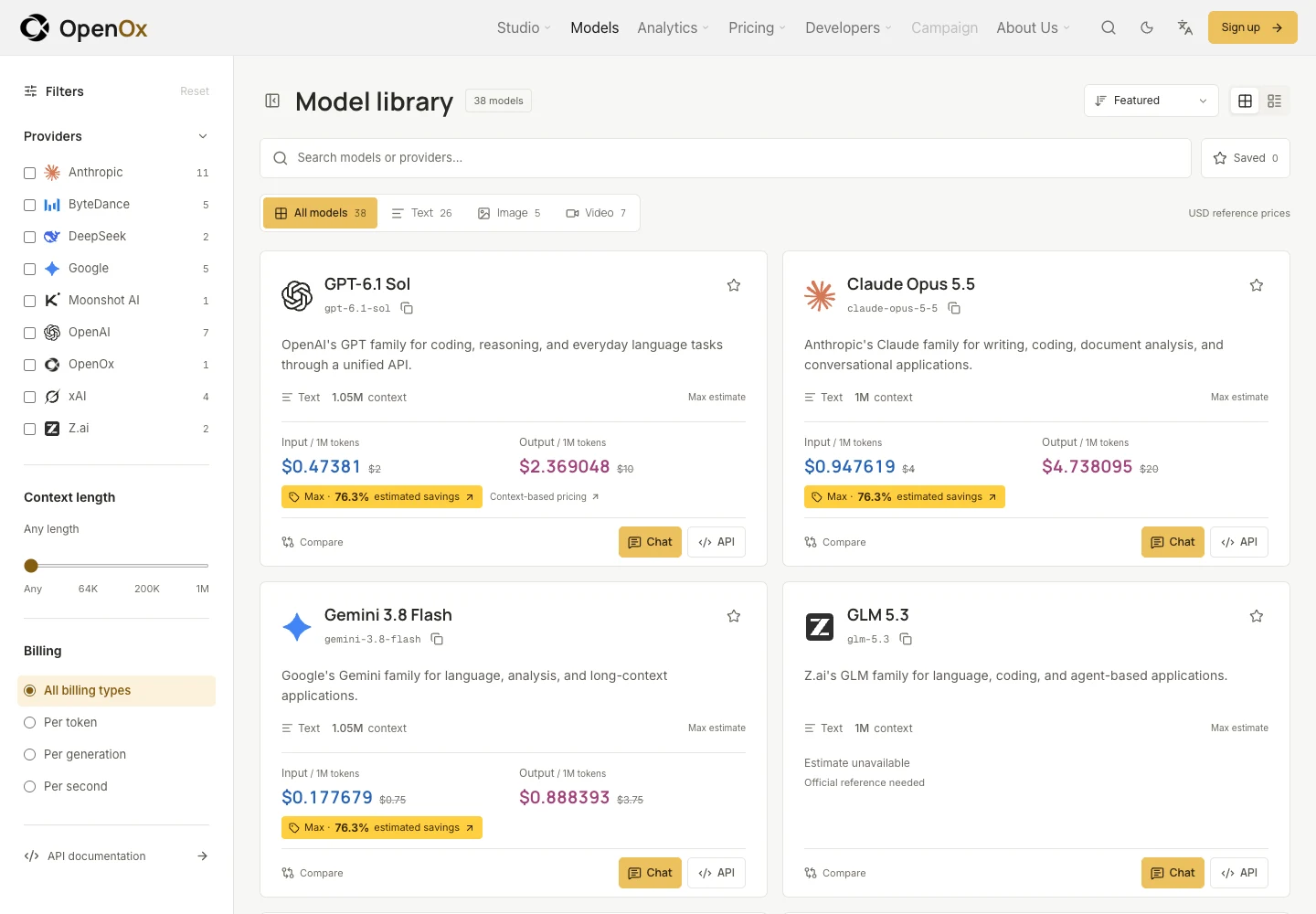
The model catalog helps you explore available models and review the information relevant to your task.
Before integrating a model, check its exact model ID, capabilities, context information, API support, and current pricing. Availability and pricing may change, so refer to the current catalog when making a decision.
A practical way to choose:
- Start with the task your application needs to perform.
- Compare the available model details and pricing.
- Test representative examples from your own workflow.
- Review usage as you evaluate quality and cost.
Compatible API Access
OpenOx provides text API endpoints for connecting applications and supported clients to available models.
The public text API includes Chat Completions, Responses, and Anthropic Messages endpoints. Configure the endpoint, API key, and exact model ID required by your application. Parameter, streaming, and tool support depend on the selected model and endpoint.
This gives developers a documented path from model selection to application integration, while keeping model-specific requirements visible.
API Keys and Access Management
API keys authenticate requests made by your applications and clients.
Create and manage keys from your account, and review their product, group, and model access. Organizing keys around how they are used can make it easier to understand which integration is associated with a request.
Keep keys private and store them according to their purpose. Do not place secret keys in public pages or repositories.
Studio Workspace
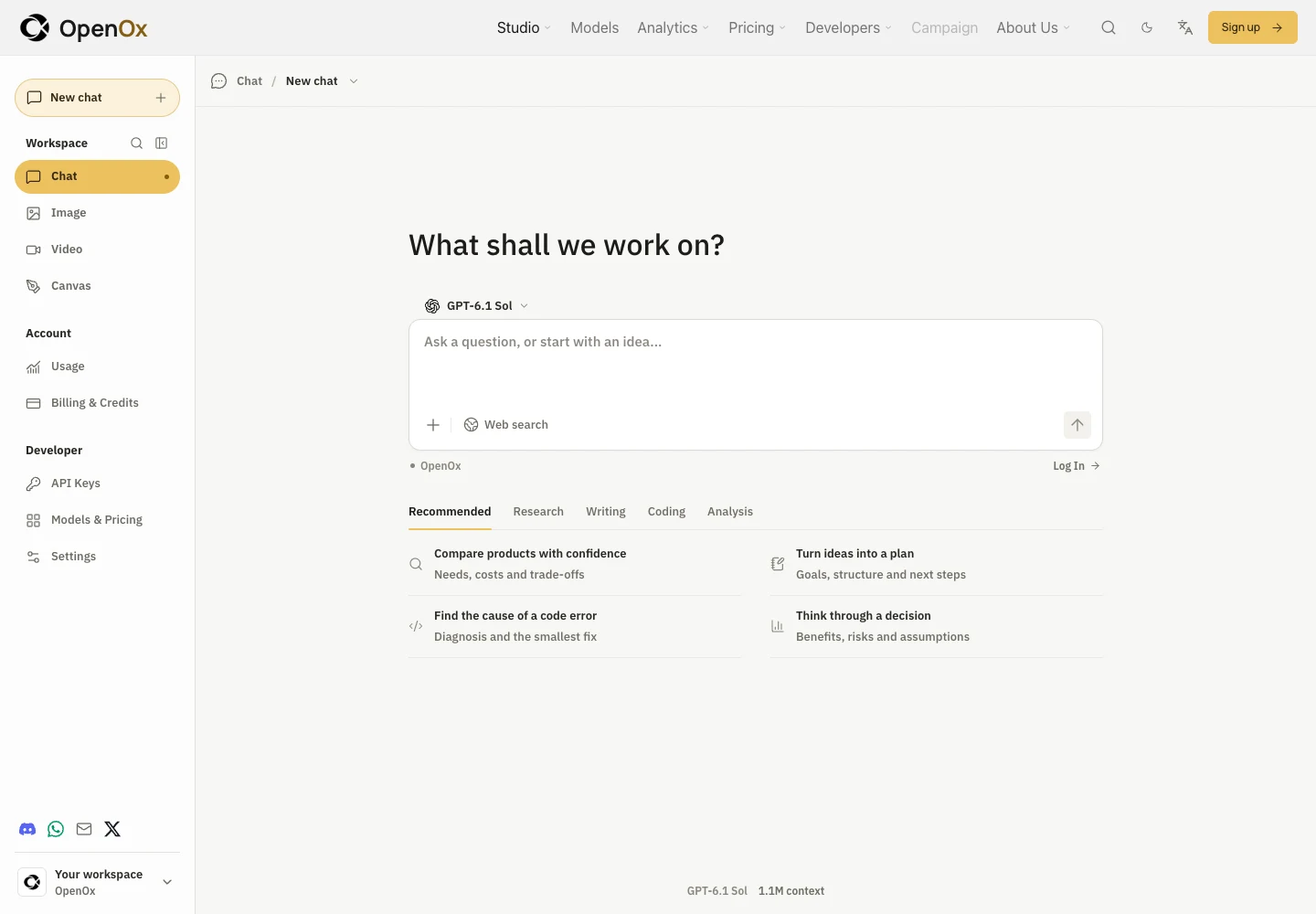
Studio provides a browser-based workspace with Chat, Image, and Video views.
Use the available models and settings to explore prompts, review results, and try creative workflows. Studio is also a place to evaluate an idea before deciding whether an API integration fits your product.
Studio features and model availability follow the options currently shown in the workspace. Availability in Studio does not necessarily mean the same capability is available through a public API endpoint.
Usage and Cost Review
Usage records help you review model activity, token consumption, and charges in your account.
You can use these records to understand how model choice, prompt length, and conversation history affect the cost of a workflow. For budget planning, test a small set of representative tasks, review actual usage, and estimate from those results.
Check the current model pricing and applicable billing details before scaling usage.
Integrations and Support
OpenOx documentation includes setup guidance for supported clients and tools, including CC Switch.
Follow the guide for the client you use, and verify its endpoint, API key, model ID, and supported features. You can also configure clients directly when they support a custom API endpoint.
If a request or billing issue needs review, retain the relevant time, model ID, request details, and error message, and contact OpenOx through its published support channel. Do not include full API keys or passwords in support requests.
Contact Us
For product questions, technical issues, or feedback, please use the contact options published on the OpenOx website. When reporting an issue, include enough information to help identify the request, while removing API keys, passwords, and other secrets.