
1. Preparation
1. An OpenOx account.
2. WorkBuddy.
2. Sign In to OpenOx
1. Create a GPT API key under Token Management on the left.
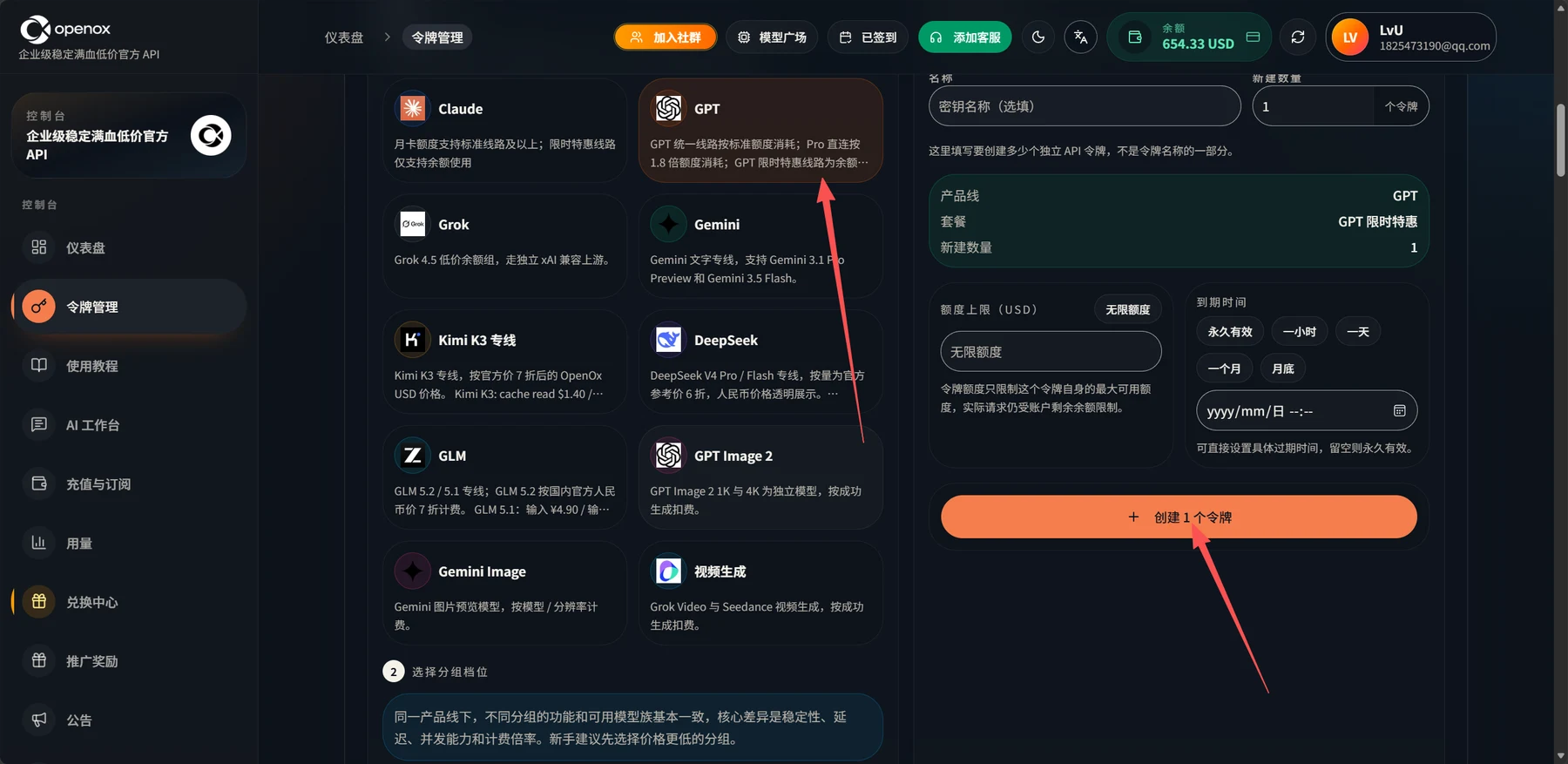
Screenshot 1: English Translation
Console: Enterprise-grade stability, full-capability, low-cost official API.
Navigation: Dashboard; Token Management; Tutorials; AI Workspace; Top Up and Subscribe; Usage; Redemption Center; Referral Rewards; Announcements.
Header: Join the Community; Model Hub; Checked In; Contact Customer Support; Balance, 654.33 USD.
Claude: Monthly-pass quota supports standard routes and above; limited-time promotional routes only support balance usage.
GPT: The unified GPT route consumes quota at the standard rate; Pro direct access consumes quota at 1.8 times the rate; the GPT limited-time promotional route is a balance...
Grok: Grok 4.5 low-cost balance group, using an independent xAI-compatible upstream.
Gemini: Dedicated Gemini text route, supporting Gemini 3.1 Pro Preview and Gemini 3.5 Flash.
Kimi K3 Dedicated Route: A dedicated Kimi K3 route, using OpenOx USD prices at 70% of the official price. Kimi K3: cache read $1.40 /...
DeepSeek: Dedicated DeepSeek V4 Pro / Flash route, with usage-based pricing at 60% of the official reference price; RMB pricing is displayed transparently. ...
GLM: Dedicated GLM 5.2 / 5.1 route; GLM 5.2 is billed at 70% of the official domestic RMB price. GLM 5.1: input ¥4.90 / out...
GPT Image 2: GPT Image 2 1K and 4K are separate models, charged per successful generation.
Gemini Image: Gemini image preview models, billed by model / resolution.
Video Generation: Grok Video and Seedance video generation, charged per successful generation.
2. Select a Group Tier. Within the same product line, the features and available models are largely the same across groups. The main differences are stability, latency, concurrency, and billing multipliers. Beginners are advised to start with a lower-priced group.
Name: Key Name (optional). Number to Create: 1 token. Enter the number of independent API tokens to create here; this is not part of the token name.
Product Line: GPT. Plan: GPT Limited-Time Promotion. Number to Create: 1.
Quota Limit (USD): Unlimited Quota. The token quota limits only the maximum allowance available to this token; actual requests are still subject to the account's remaining balance.
Expiration Time: Never Expires; One Hour; One Day; One Month; End of Month. You can set a specific expiration time directly; leave it blank for no expiration.
Create 1 Token.
2. Use this base URL.
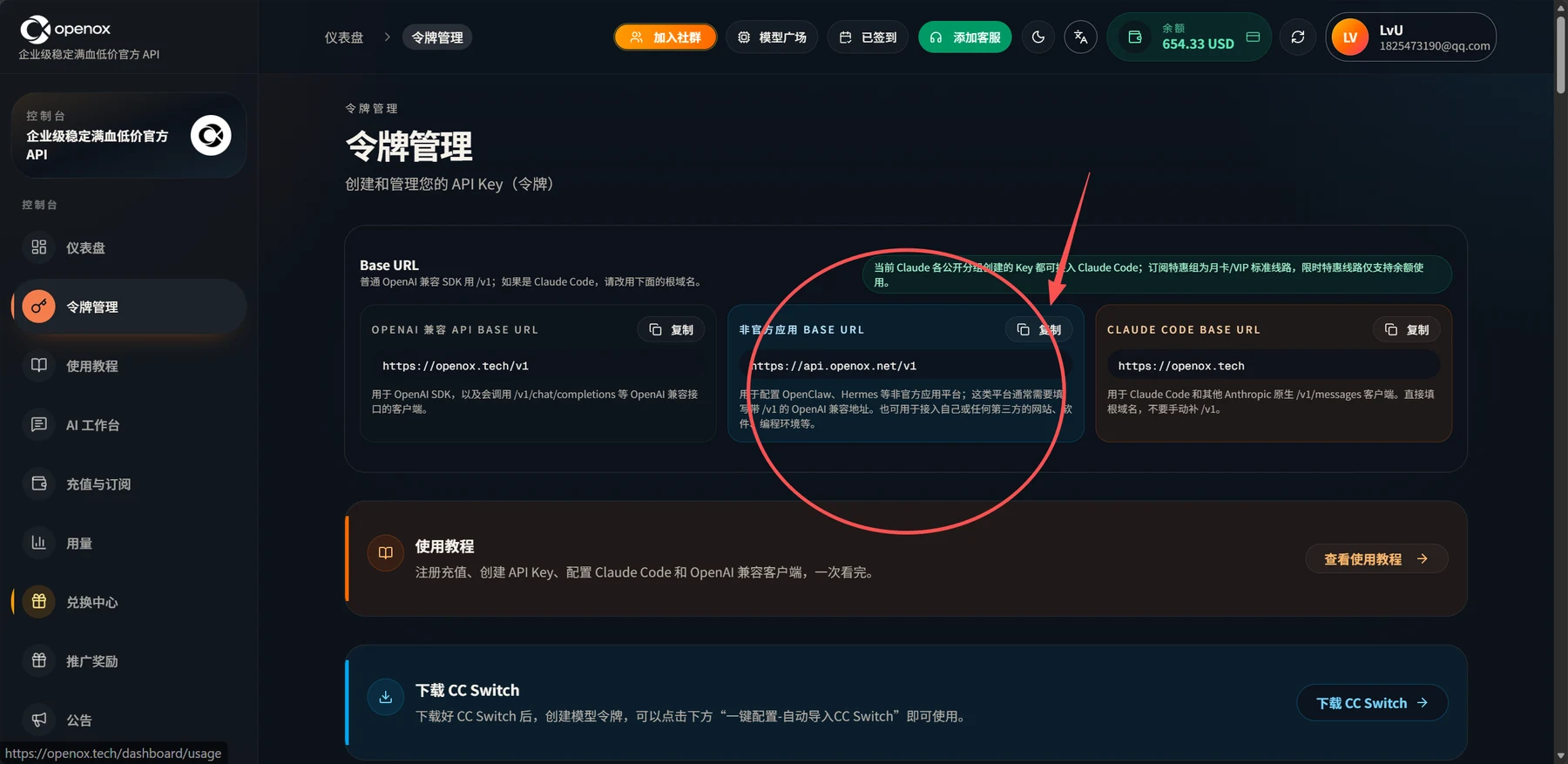
Screenshot 2: English Translation
Token Management. Create and manage your API keys (tokens).
Base URL: Use /v1 for standard OpenAI-compatible SDKs. For Claude Code, use the root domain below.
Keys created in all currently available Claude groups can be used with Claude Code. Subscription promotional groups use monthly-pass/VIP standard routes; limited-time promotional routes only support balance usage.
OpenAI-Compatible API Base URL: https://api.openoxai.com/v1. Copy. For the OpenAI SDK and clients that call OpenAI-compatible endpoints such as /v1/chat/completions.
Base URL for Unofficial Applications: https://api.openoxai.com/v1. Copy. Used to configure unofficial application platforms such as OpenClaw and Hermes. These platforms usually require an OpenAI-compatible URL that includes /v1. It can also be used to connect your own or any third-party websites, software, programming environments, and so on.
Claude Code Base URL: https://api.openoxai.com/. Copy. For Claude Code and other clients using Anthropic's native /v1/messages endpoint. Enter the root domain directly; do not manually append /v1.
Tutorials: Sign up and top up, create an API key, and configure Claude Code and OpenAI-compatible clients, all in one guide. View Tutorials.
Download CC Switch: After downloading CC Switch, create a model token, then click "One-Click Configuration - Automatically Import into CC Switch" below to start using it. Download CC Switch.
Navigation: Console; Dashboard; Token Management; Tutorials; AI Workspace; Top Up and Subscribe; Usage; Redemption Center; Referral Rewards; Announcements. Header: Join the Community; Model Hub; Checked In; Contact Customer Support; Balance. Enterprise-grade stability, full-capability, low-cost official API.
3. Click Model Hub and select the model you want.
Choose an available model
Open the live model catalog, select an available GPT model, and copy its exact model ID. For example, use gpt-5.6-sol. Check the model detail for current prices and supported groups.
4. Copy it here and paste it into the Model Name field in the following steps.
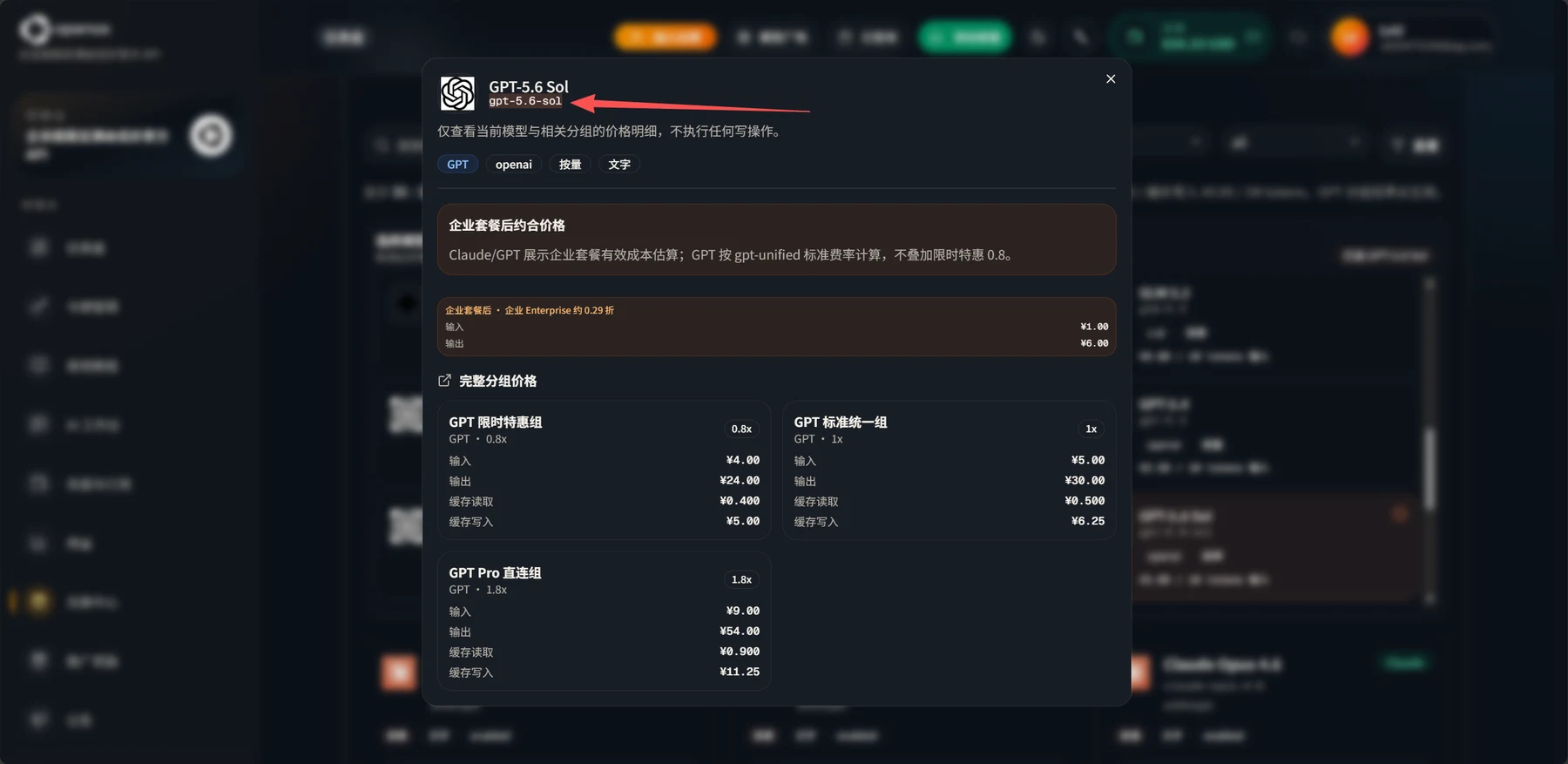
Screenshot 4: English Translation
GPT-5.6 Sol. Model name: gpt-5.6-sol.
View pricing details for the current model and related groups only; no write operations are performed.
Labels: Usage-Based; Text.
Approximate Effective Price After the Enterprise Plan: Claude/GPT display estimated effective costs under the enterprise plan. GPT is calculated using the gpt-unified standard rate, without additionally applying the limited-time promotional 0.8 multiplier.
After the Enterprise Plan: Enterprise, approximately 2.9% of the original price. Input: ¥1.00. Output: ¥6.00.
Full Group Pricing:
- GPT Limited-Time Promotional Group (GPT, 0.8x): Input ¥4.00; Output ¥24.00; Cache Read ¥0.400; Cache Write ¥5.00.
- GPT Standard Unified Group (GPT, 1x): Input ¥5.00; Output ¥30.00; Cache Read ¥0.500; Cache Write ¥6.25.
- GPT Pro Direct-Connection Group (GPT, 1.8x): Input ¥9.00; Output ¥54.00; Cache Read ¥0.900; Cache Write ¥11.25.
3. Sign In to WorkBuddy and Import the ChatGPT Model
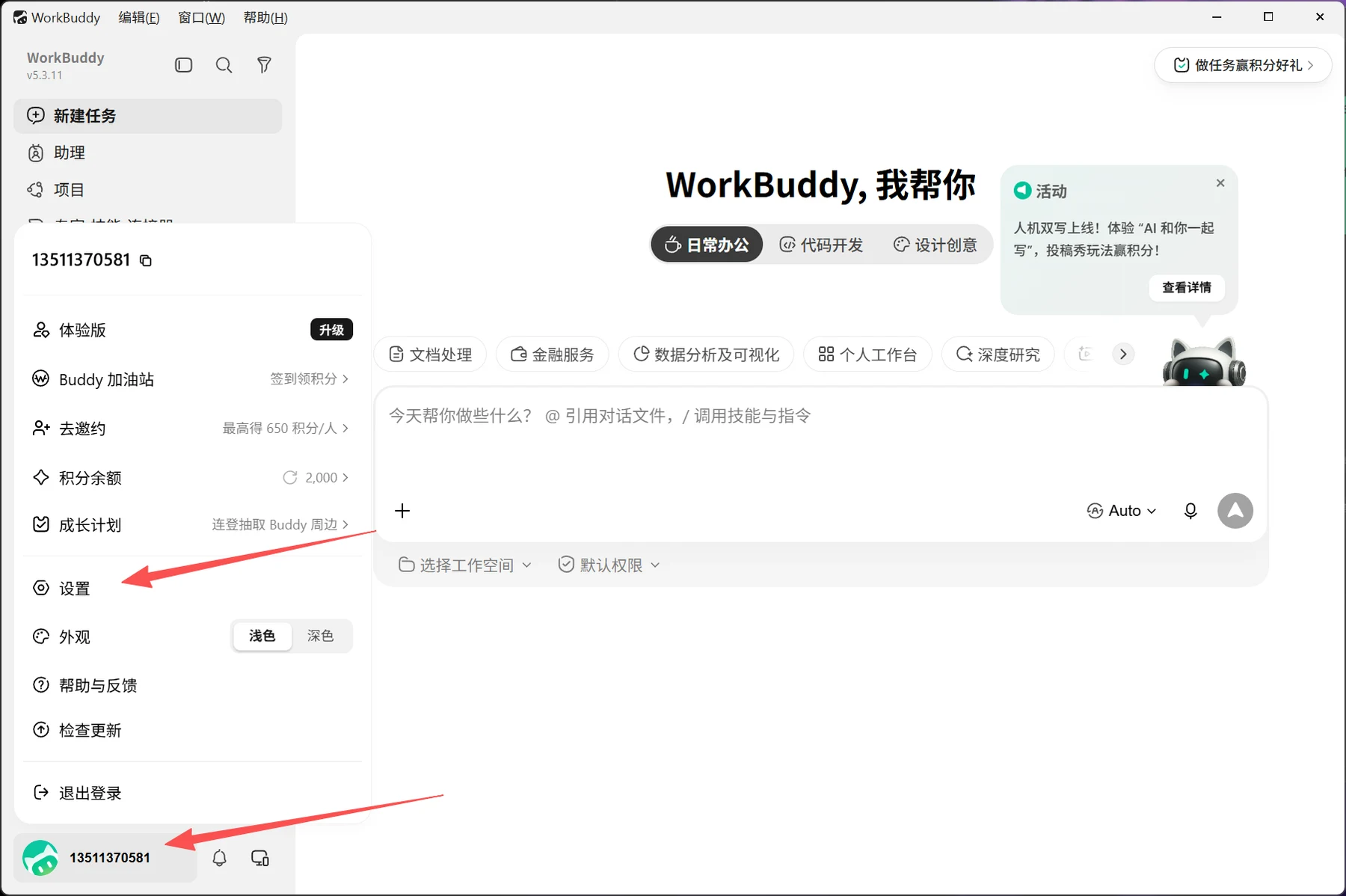
Screenshot 5: English Translation
Menu bar: Edit; Window; Help. Navigation: New Task; Assistant; Projects.
WorkBuddy, I'll Help You. Modes: Everyday Office Work; Software Development; Design and Creativity.
Complete Tasks to Earn Points and Rewards.
Event: Human-AI co-writing is live! Try "AI Writes with You" and submit your creative uses to earn points. View Details.
Categories: Document Processing; Financial Services; Data Analysis and Visualization; Personal Workspace; Deep Research.
What can I help you do today? Use @ to reference conversations and files, and / to invoke skills and commands.
Select Workspace; Default Permissions.
Account menu: Trial Edition; Upgrade; Buddy Recharge Station; Check In to Earn Points; Invite Others; Earn Up to 650 Points per Person; Points Balance, 2,000; Growth Plan; Log In on Consecutive Days for a Chance to Win Buddy Merchandise; Settings; Appearance; Light; Dark; Help and Feedback; Check for Updates; Sign Out.
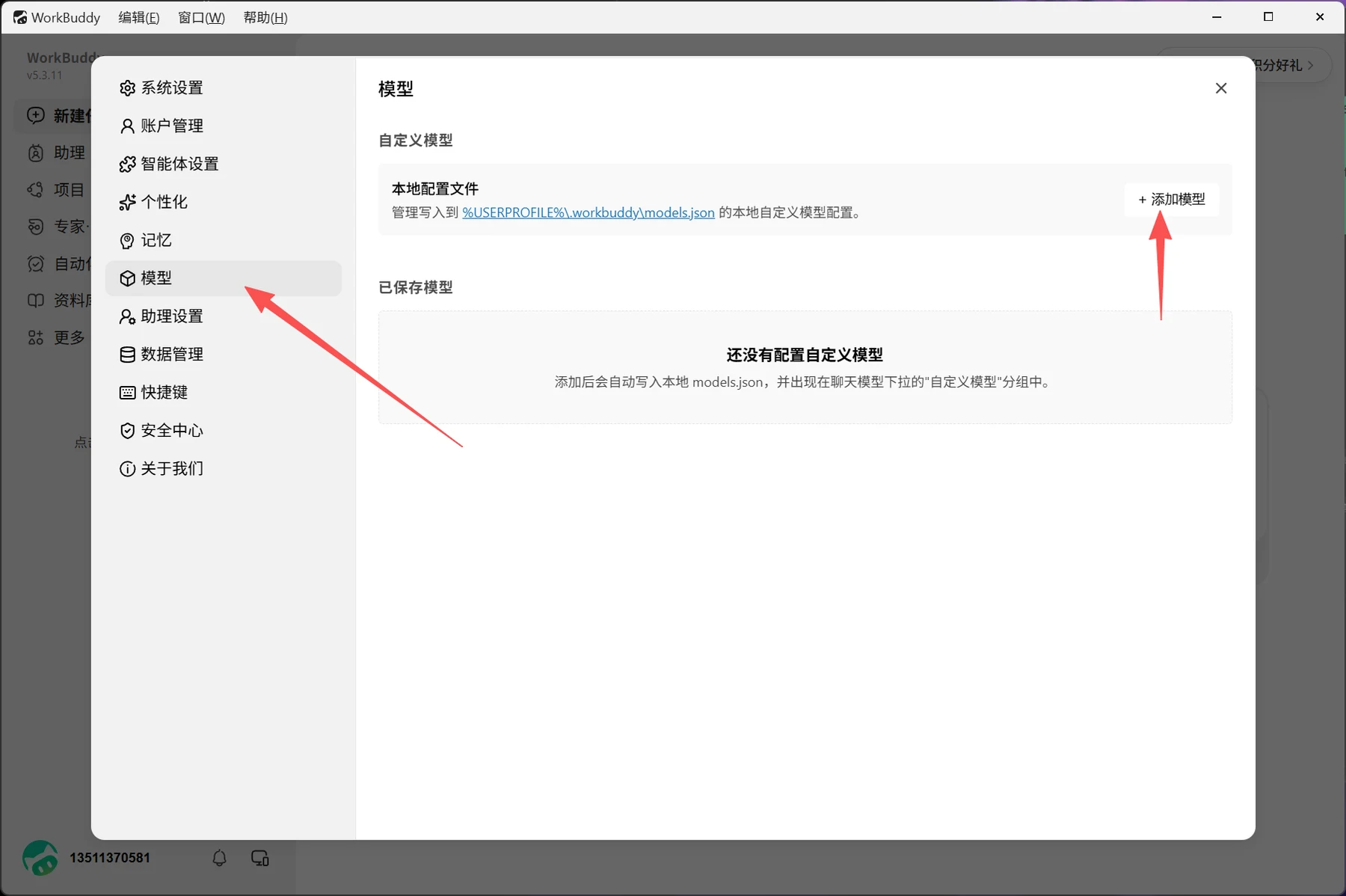
Screenshot 6: English Translation
System Settings. Categories: Account Management; Agent Settings; Personalization; Memory; Models; Assistant Settings; Data Management; Keyboard Shortcuts; Security Center; About Us.
Models. Custom Models.
Local Configuration File: Manage local custom model configurations written to %USERPROFILE%\.workbuddy\models.json.
Add Model. Saved Models.
No Custom Models Configured Yet. After a model is added, it is automatically written to the local models.json file and appears in the "Custom Models" group in the chat model dropdown.
Background navigation: New Task; Assistant; Projects; Experts, Skills, and Connectors; Automation; Knowledge Library; More. Menu bar: Edit; Window; Help.
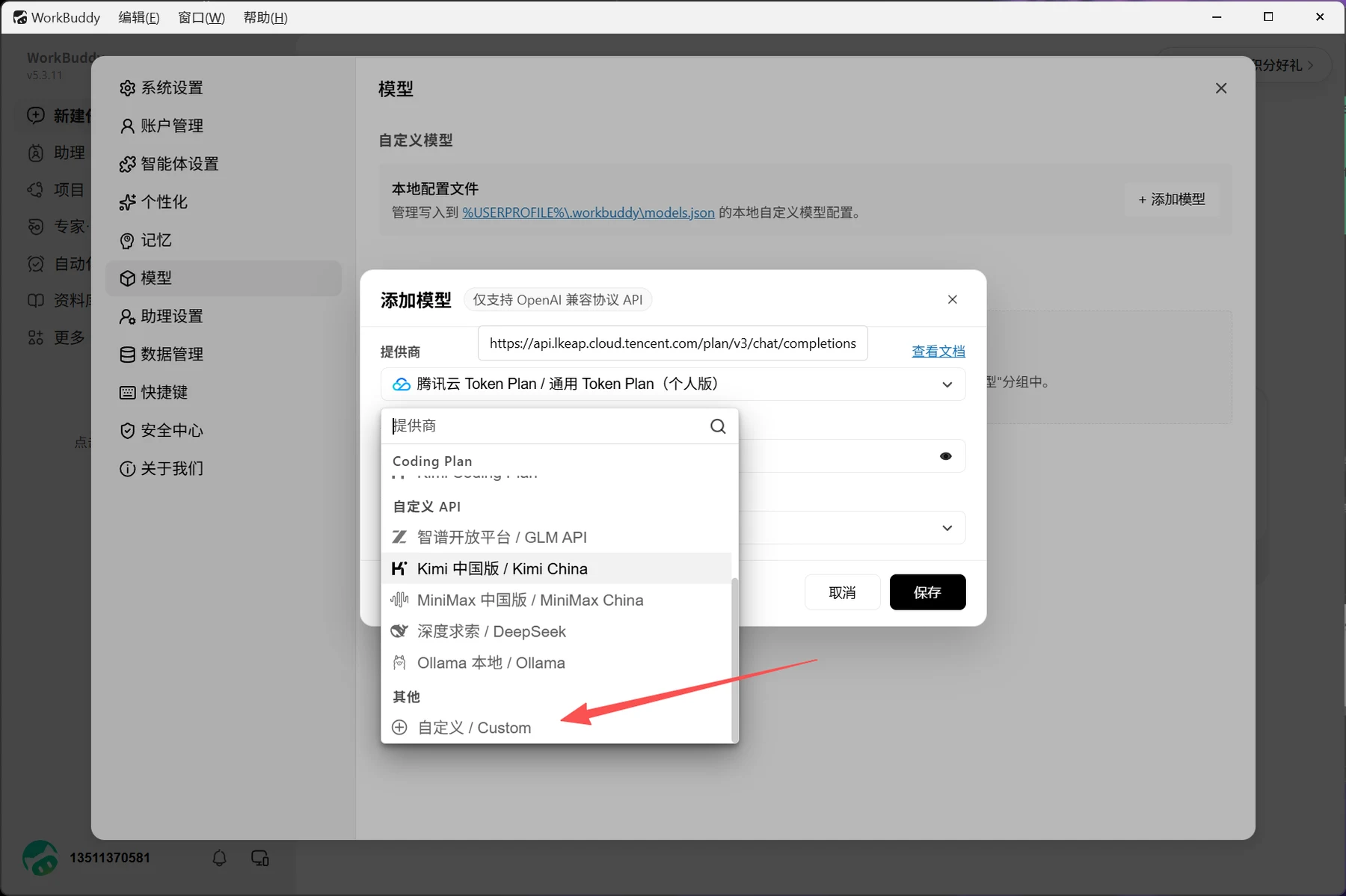
Screenshot 7: English Translation
Add Model. Only APIs using the OpenAI-compatible protocol are supported.
Provider; View Documentation.
Tencent Cloud Token Plan / General Token Plan (Personal Edition).
Visible endpoint: https://api.lkeap.cloud.tencent.com/plan/v3/chat/completions.
Provider menu: Coding Plan; Custom API; Zhipu Open Platform / GLM API; Kimi China; MiniMax China; DeepSeek; Local Ollama / Ollama; Other; Custom.
Cancel; Save.
Background settings: System Settings; Account Management; Agent Settings; Personalization; Memory; Models; Assistant Settings; Data Management; Keyboard Shortcuts; Security Center; About Us; Custom Models; Local Configuration File; Add Model.
Manage local custom model configurations written to %USERPROFILE%\.workbuddy\models.json.
Background navigation: New Task; Assistant; Projects; Experts, Skills, and Connectors; Automation; Knowledge Library; More. Menu bar: Edit; Window; Help.
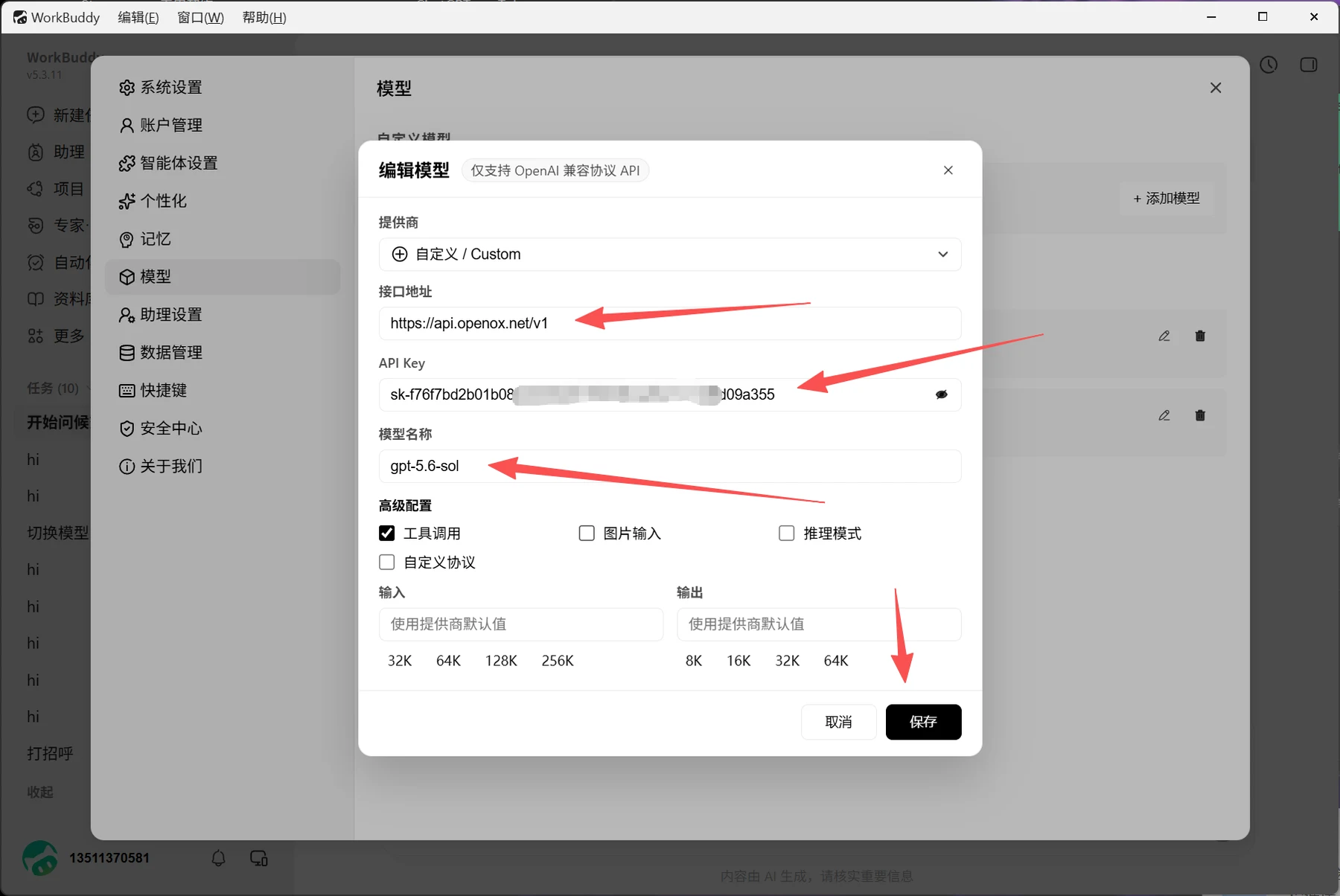
Screenshot 8: English Translation
Edit Model. Only APIs using the OpenAI-compatible protocol are supported.
Provider: Custom.
Endpoint URL: https://api.openoxai.com/v1.
API Key: [Partially obscured in the original image.]
Model Name: gpt-5.6-sol.
Advanced Configuration: Tool Calling (checked); Image Input (unchecked); Reasoning Mode (unchecked); Custom Protocol (unchecked).
Input: Use the provider's default value. Options: 32K, 64K, 128K, 256K.
Output: Use the provider's default value. Options: 8K, 16K, 32K, 64K.
Cancel; Save.
Background settings: System Settings; Account Management; Agent Settings; Personalization; Memory; Models; Assistant Settings; Data Management; Keyboard Shortcuts; Security Center; About Us; Custom Models; Add Model.
Background navigation: New Task; Assistant; Projects; Experts, Skills, and Connectors; Automation; Knowledge Library; More; Tasks (10); Start a Greeting; Switch Models; Say Hello; Collapse. Menu bar: Edit; Window; Help.
AI-generated content. Please verify important information.
Select the model you just created in the bottom-right corner and test it. If it responds, the integration is working.
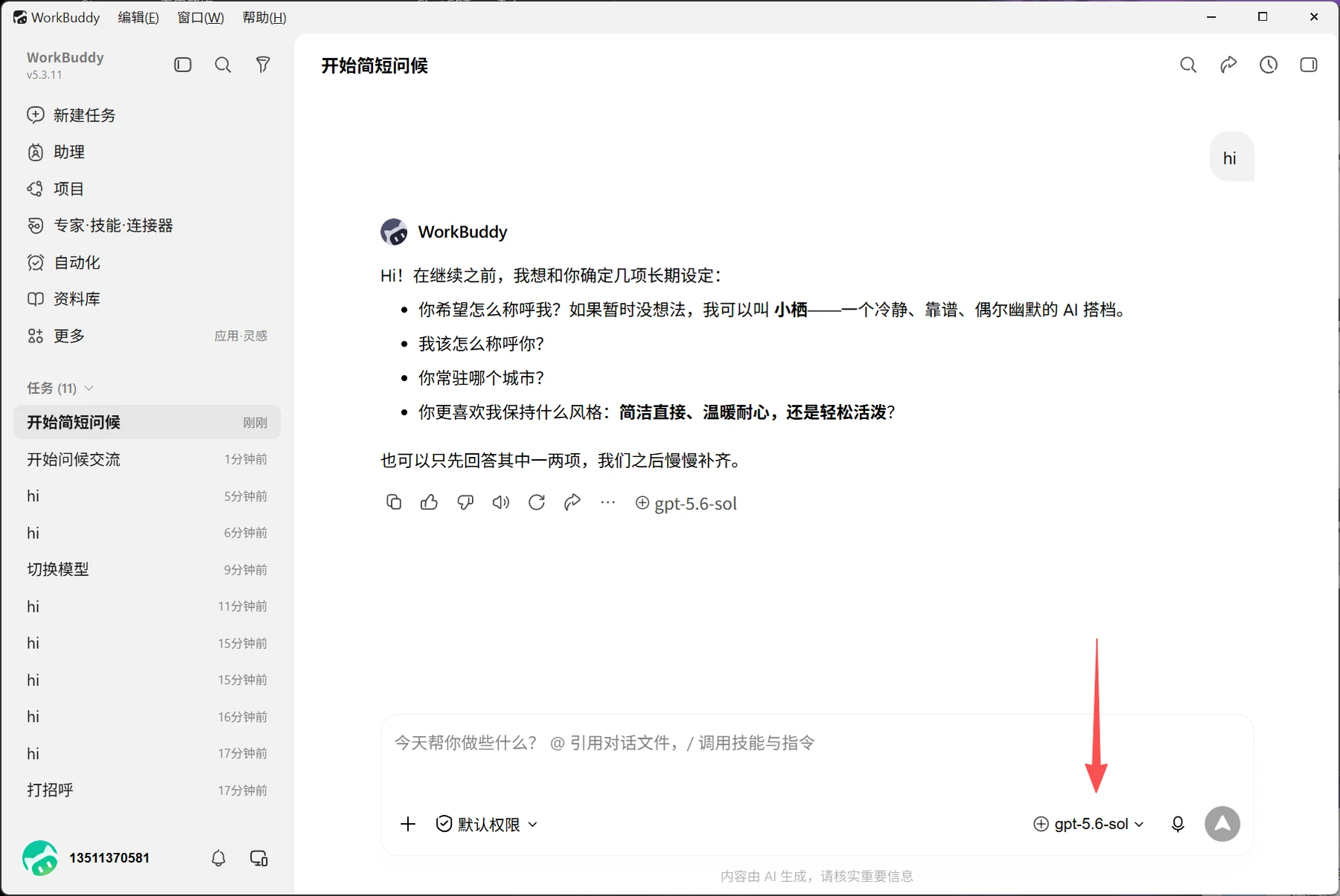
Screenshot 9: English Translation
Start a Brief Greeting.
WorkBuddy:
Hi! Before we continue, I'd like to confirm a few long-term preferences with you:
- What would you like to call me? If you don't have anything in mind yet, I can be called Xiaoqi, a calm, reliable AI companion with an occasional sense of humor.
- What should I call you?
- Which city are you based in?
- What style would you prefer me to maintain: concise and direct, warm and patient, or relaxed and lively?
You can answer just one or two of these for now, and we can fill in the rest gradually.
Selected model: gpt-5.6-sol.
What can I help you do today? Use @ to reference conversations and files, and / to invoke skills and commands. Default Permissions.
Navigation: New Task; Assistant; Projects; Experts, Skills, and Connectors; Automation; Knowledge Library; More; Apps and Inspiration; Tasks (11).
Task titles and times: Start a Brief Greeting, Just Now; Start a Greeting Conversation, 1 Minute Ago; hi, 5 Minutes Ago; hi, 6 Minutes Ago; Switch Models, 9 Minutes Ago; hi, 11 Minutes Ago; hi, 15 Minutes Ago; hi, 15 Minutes Ago; hi, 16 Minutes Ago; hi, 17 Minutes Ago; Say Hello, 17 Minutes Ago.
Menu bar: Edit; Window; Help. AI-generated content. Please verify important information.