
1. Preparation
1. Make sure CC Switch is installed on your computer.
2. Make sure you have a VPN/proxy on your computer.
3. Have an OpenOx account.
2. Download Claude Desktop
1. Use Google Chrome to look up https://claude.com/download?open_in_browser=1.
The webpage will appear.
2. Click Download.
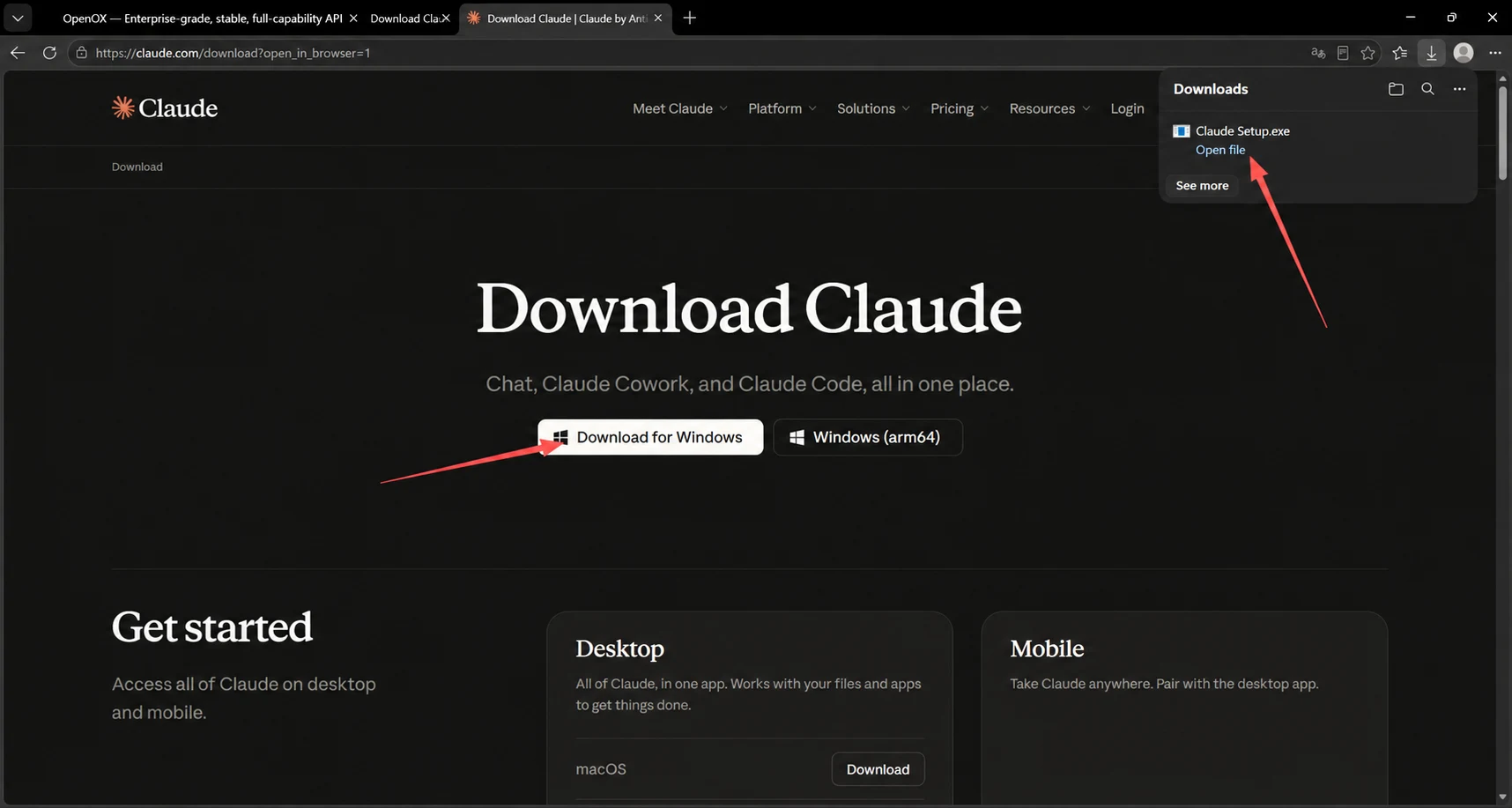
Screenshot 1: English Translation
Browser download panel: Downloads; Open File; See More. File: Claude Setup.exe.
OpenOx browser tab: Enterprise-grade stability, full-capability, low-cost official... [Title truncated in the original image.]
3. Wait for the download to finish. You do not need to sign in using email.
3. Get an API Key
1. Click Token Management.
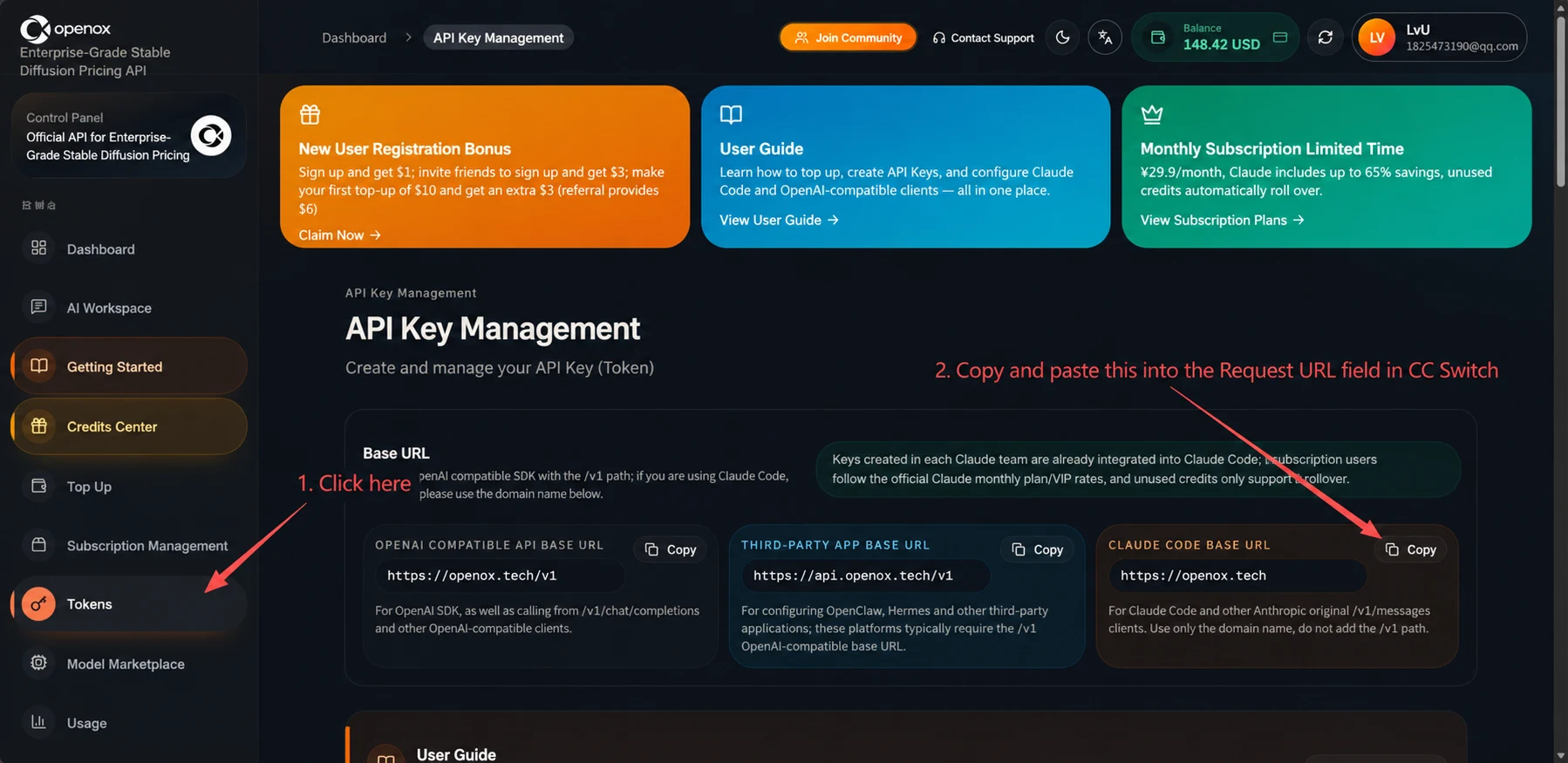
Screenshot 2: English Translation
Annotations: 1. Click. 2. Copy and paste this into the Request URL field on the CC Switch configuration page.
Token Management: Create and manage your API keys (tokens).
Base URL: Use /v1 for standard OpenAI-compatible SDKs. For Claude Code, use the root domain below.
Keys created in all currently available Claude groups can be used with Claude Code. Subscription promotional groups use monthly-pass/VIP standard routes; limited-time promotional routes only support balance usage.
OpenAI-Compatible API Base URL: https://api.openoxai.com/v1. Copy. For the OpenAI SDK and clients that call OpenAI-compatible endpoints such as /v1/chat/completions.
Base URL for Unofficial Applications: https://api.openoxai.com/v1. Copy. Used to configure unofficial application platforms such as OpenClaw and Hermes. These platforms usually require an OpenAI-compatible URL that includes /v1.
Claude Code Base URL: https://api.openoxai.com/. Copy. For Claude Code and other clients using Anthropic's native /v1/messages endpoint. Enter the root domain directly; do not manually append /v1.
New User Sign-Up Gift: Get $1 when you sign up; get $3 when you sign up with an invitation code; get an extra $3 on your first $10 top-up ($6 if invited). Claim Now.
Tutorials: Sign up and top up, create an API key, and configure Claude Code and OpenAI-compatible clients, all in one guide. View Tutorials.
Limited-Time Monthly Subscription: From ¥29.9/month. Save up to approximately 65% with a monthly Claude subscription. Your balance is protected by default when the quota runs out. View Subscription Plans.
Console: Enterprise-grade stability, full-capability, low-cost official API.
Navigation: Dashboard; AI Workspace; Tutorials; Redemption Center; Top Up; Subscription Management; Token Management; Model Hub; Usage.
Header: Join the Community; Contact Customer Support; Balance, 148.42 USD.
2. Scroll down.
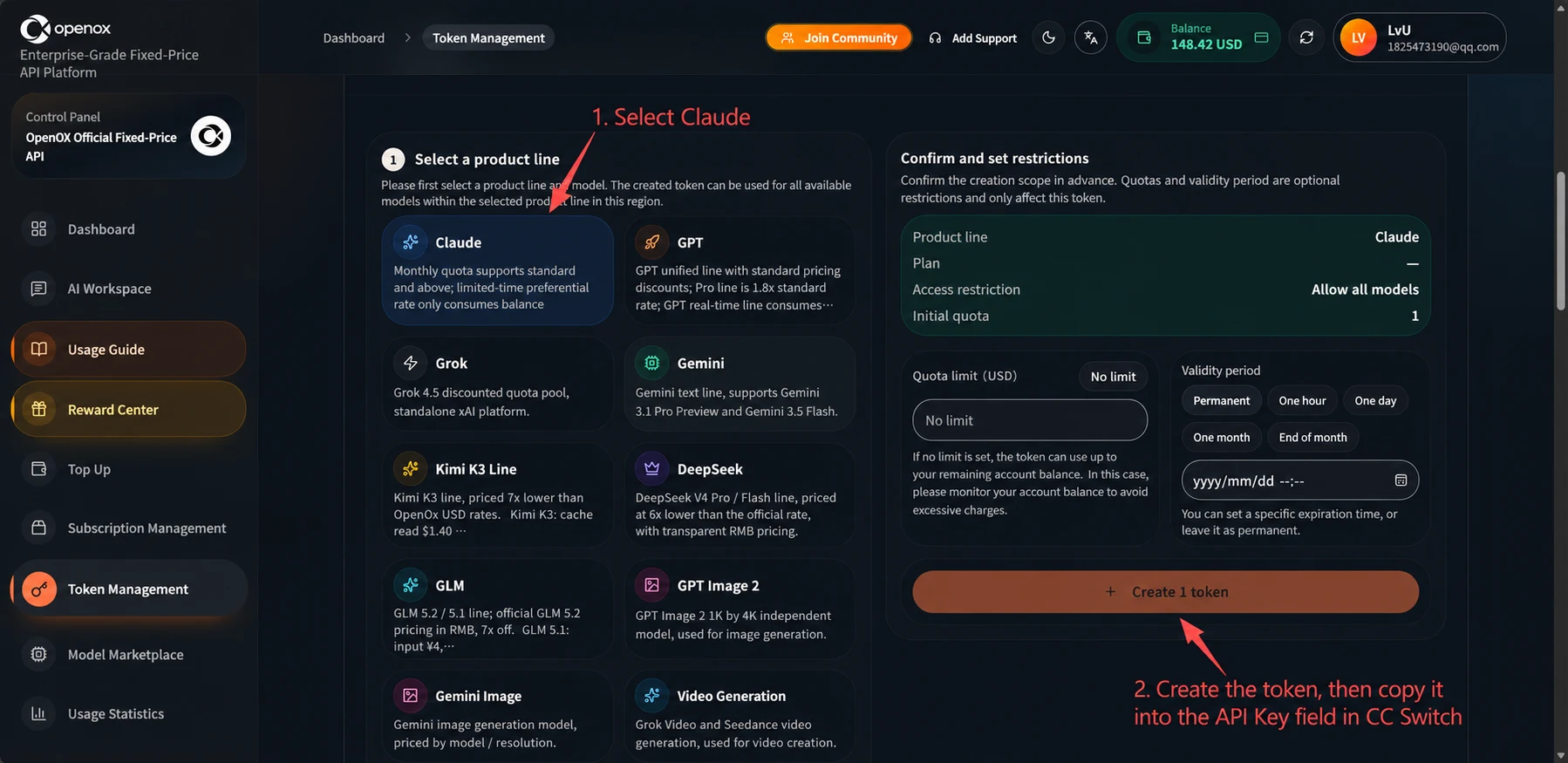
Screenshot 3: English Translation
Annotations: 1. Click. 2. Create the key, then copy and paste it into the API Key field on the CC Switch configuration page.
1. Select a Product Line. Select a product line and group first. By default, the token you create can use all available models within that scope.
Claude: Monthly-pass quota supports standard routes and above; limited-time promotional routes only support balance usage.
GPT: The unified GPT route consumes quota at the standard rate; Pro direct access consumes quota at 1.8 times the rate; GPT limited-time promotional routes...
Grok: Grok 4.5 low-cost balance group, using an independent xAI-compatible upstream.
Gemini: Dedicated Gemini text route, supporting Gemini 3.1 Pro Preview and Gemini 3.5 Flash.
Kimi K3 Dedicated Route: A dedicated Kimi K3 route, using OpenOx USD prices at 70% of the official price. Kimi K3: cache read $1.40...
DeepSeek: Dedicated DeepSeek V4 Pro / Flash route, with usage-based pricing at 60% of the official reference price; RMB pricing is displayed transparently. ...
GLM: Dedicated GLM 5.2 / 5.1 route; GLM 5.2 is billed at 70% of the official domestic RMB price. GLM 5.1: input ¥4...
GPT Image 2: GPT Image 2 1K and 4K are separate models, charged per successful generation.
Gemini Image: Gemini image preview models, billed by model / resolution.
Video Generation: Grok Video and Seedance video generation, charged per successful generation.
Confirmation and Limits: Confirm the scope before creating the token. Quota and expiration time are optional restrictions that apply only to the token being created.
Product Line: Claude; Plan: -; Access Restrictions: Allow All Models; Number to Create: 1.
Quota Limit (USD): Unlimited Quota. The token quota limits only the maximum allowance available to this token; actual requests are still subject to the account's remaining balance.
Expiration Time: Never Expires; One Hour; One Day; One Month; End of Month. You can set a specific expiration time directly; leave it blank for no expiration.
Create 1 Token.
Navigation: Console; Dashboard; AI Workspace; Tutorials; Redemption Center; Top Up; Subscription Management; Token Management; Model Hub; Usage. Header: Join the Community; Contact Customer Support; Balance. Enterprise-grade stability, full-capability, low-cost official API.
If you forgot to copy it, keep scrolling down to find the corresponding model.
4. Configure CC Switch
1. First, make sure CC Switch is updated to the latest version: Settings in the upper-left corner > About > Update.
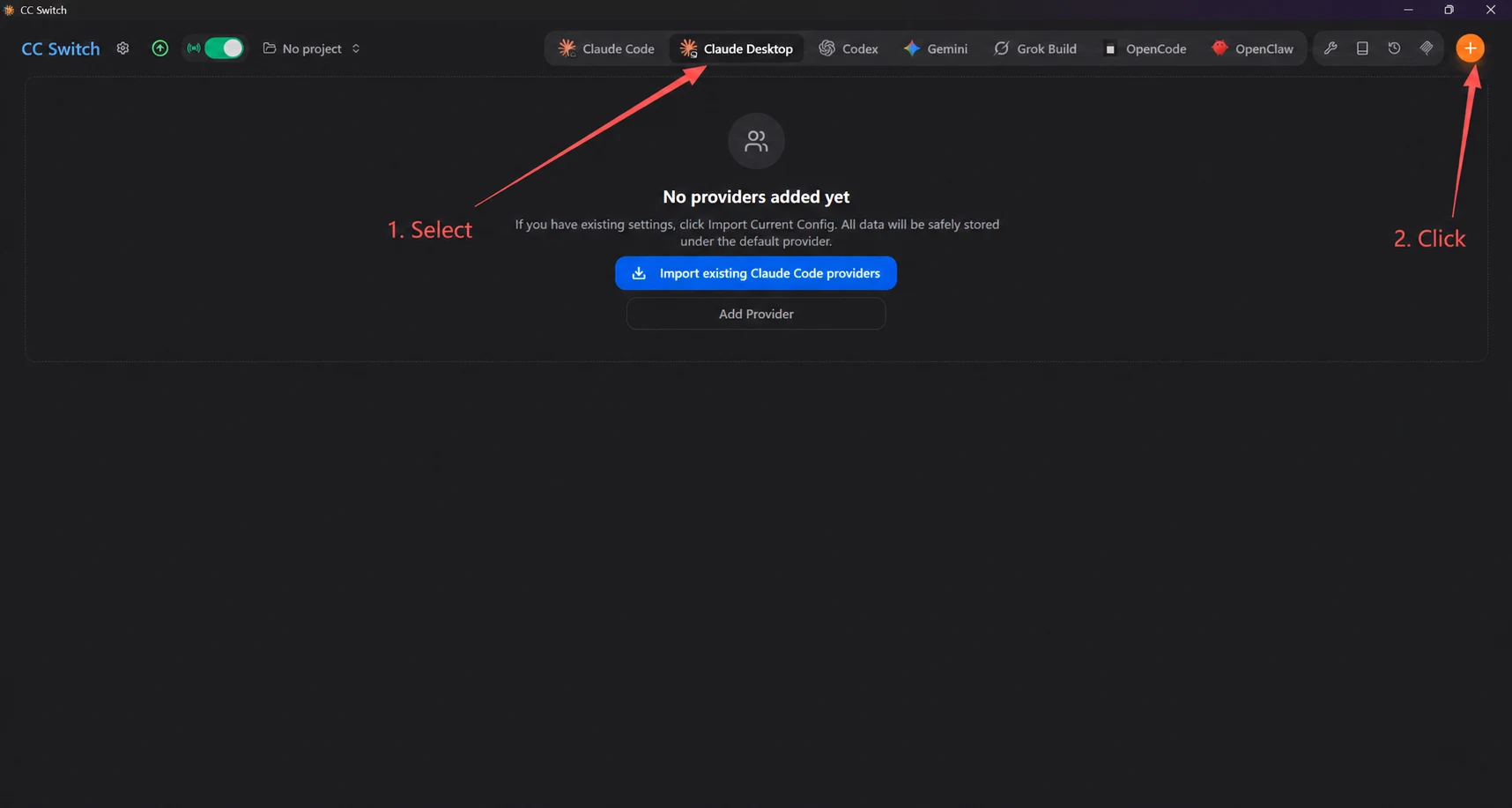
Screenshot 4: English Translation
Annotations: 1. Select Claude Desktop. 2. Click the + button.
No Project.
No Providers Added Yet. If you already have a configuration, click "Import Current Configuration". All data will be safely saved in the default provider.
Import Existing Providers from Claude Code. Add Provider.
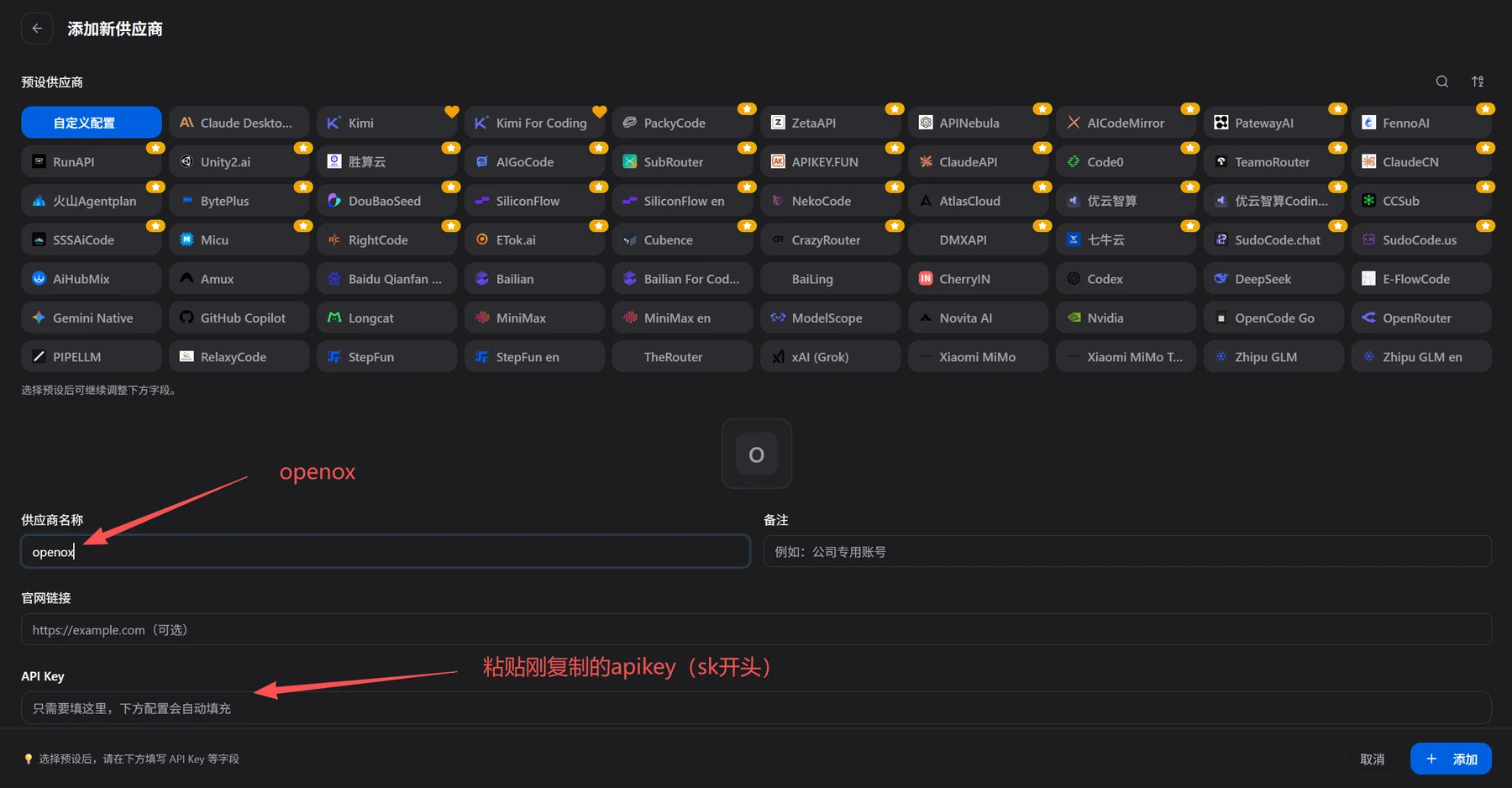
Screenshot 5: English Translation
Add New Provider. Preset Providers. Custom Configuration.
Chinese preset names: Shengsuan Cloud; Volcano Agentplan; Youyun Intelligent Computing; Youyun Intelligent Computing Coding...; Qiniu Cloud.
After selecting a preset, you can continue adjusting the fields below.
Provider Name: openox. Annotation: openox.
Notes: For example, a dedicated company account.
Website Link: https://example.com (optional).
API Key: You only need to fill in this field; the configuration below will be filled in automatically.
Annotation: Paste the API key you just copied (starting with sk).
After selecting a preset, fill in fields such as API Key below. Cancel; Add.
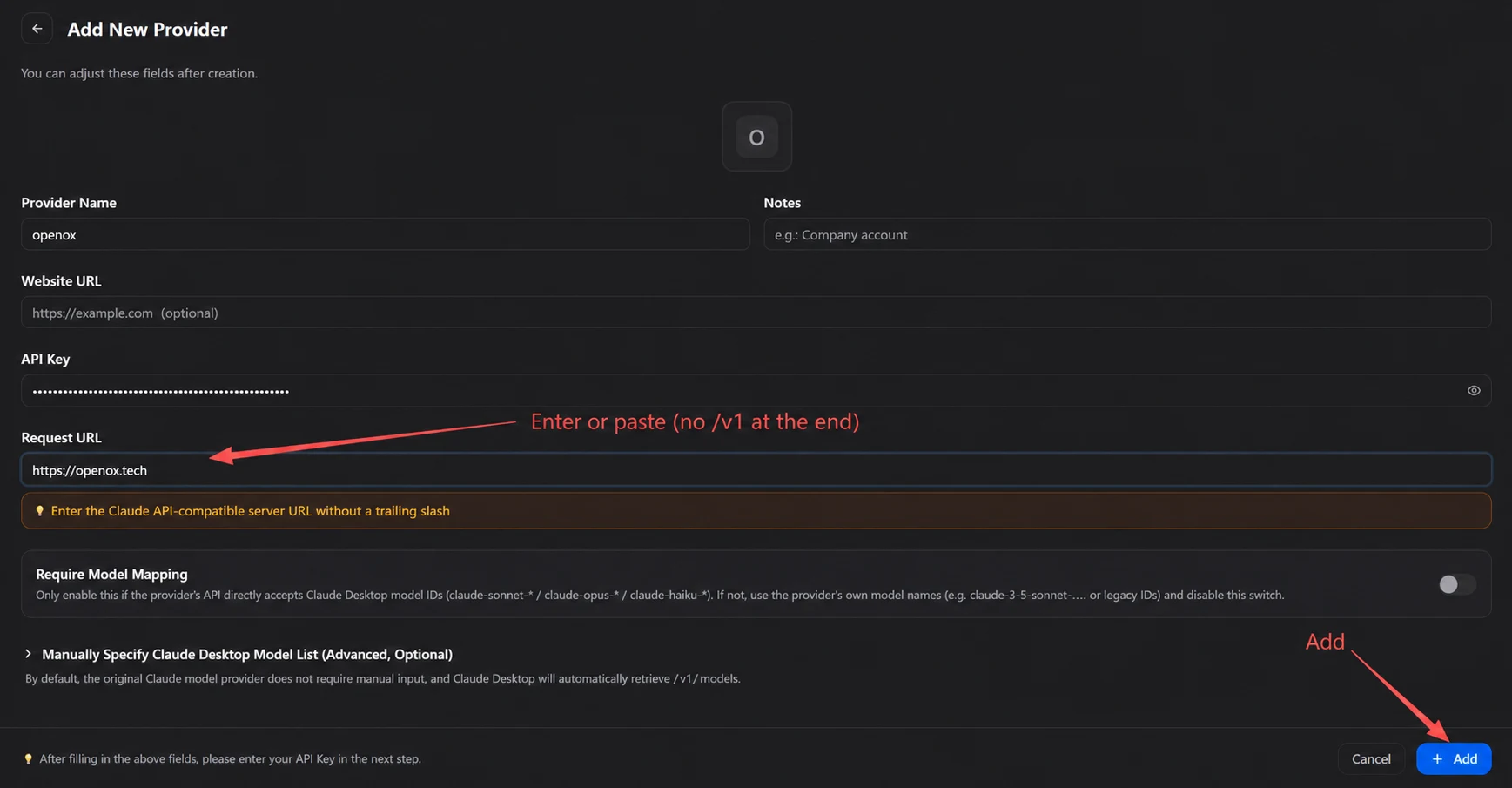
Screenshot 6: English Translation
Add New Provider. After selecting a preset, you can continue adjusting the fields below.
Provider Name: openox. Notes: For example, a dedicated company account.
Website Link: https://example.com (optional). API Key.
Request URL: https://api.openoxai.com/.
Annotation: Enter or paste the URL (without v1 at the end).
Enter a server endpoint URL compatible with the Claude API. Do not end it with a slash.
Model Mapping Required: Direct connection applies only when the provider directly accepts the three role-tier IDs recognized by Claude Desktop (claude-sonnet-* / claude-opus-* / claude-haiku-*). For other model names, including legacy IDs such as claude-3-5-sonnet-..., turn on this switch and configure mappings.
Manually Specify the Claude Desktop Model List (Advanced, Optional).
Providers of native Claude models generally do not require this field. Claude Desktop automatically fetches /v1/models.
Annotation: Add.
After selecting a preset, fill in fields such as API Key below. Cancel; Add.
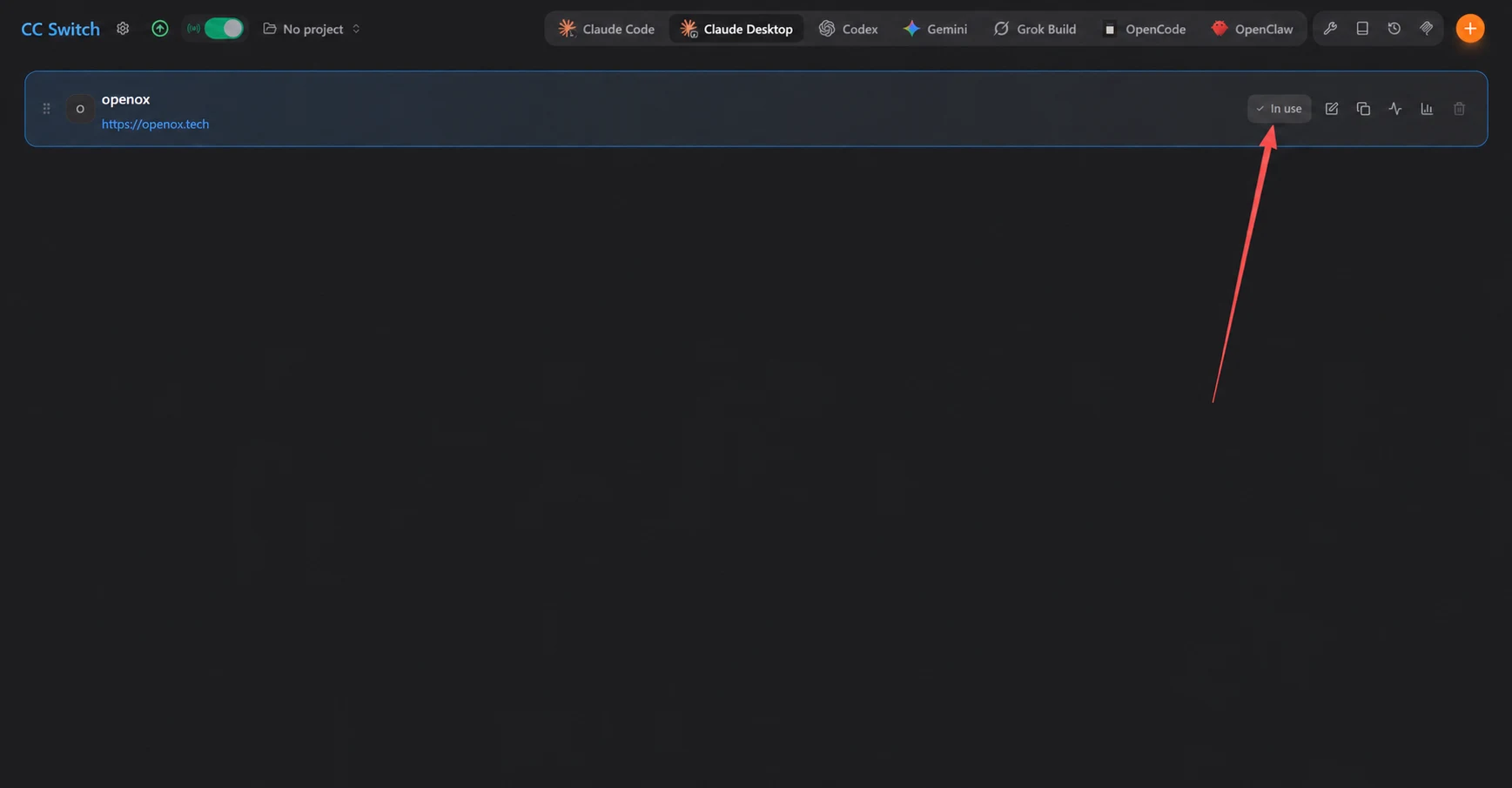
Screenshot 7: English Translation
No Project. In Use.
Provider: openox. URL: https://api.openoxai.com/.
5. Restart Claude Desktop
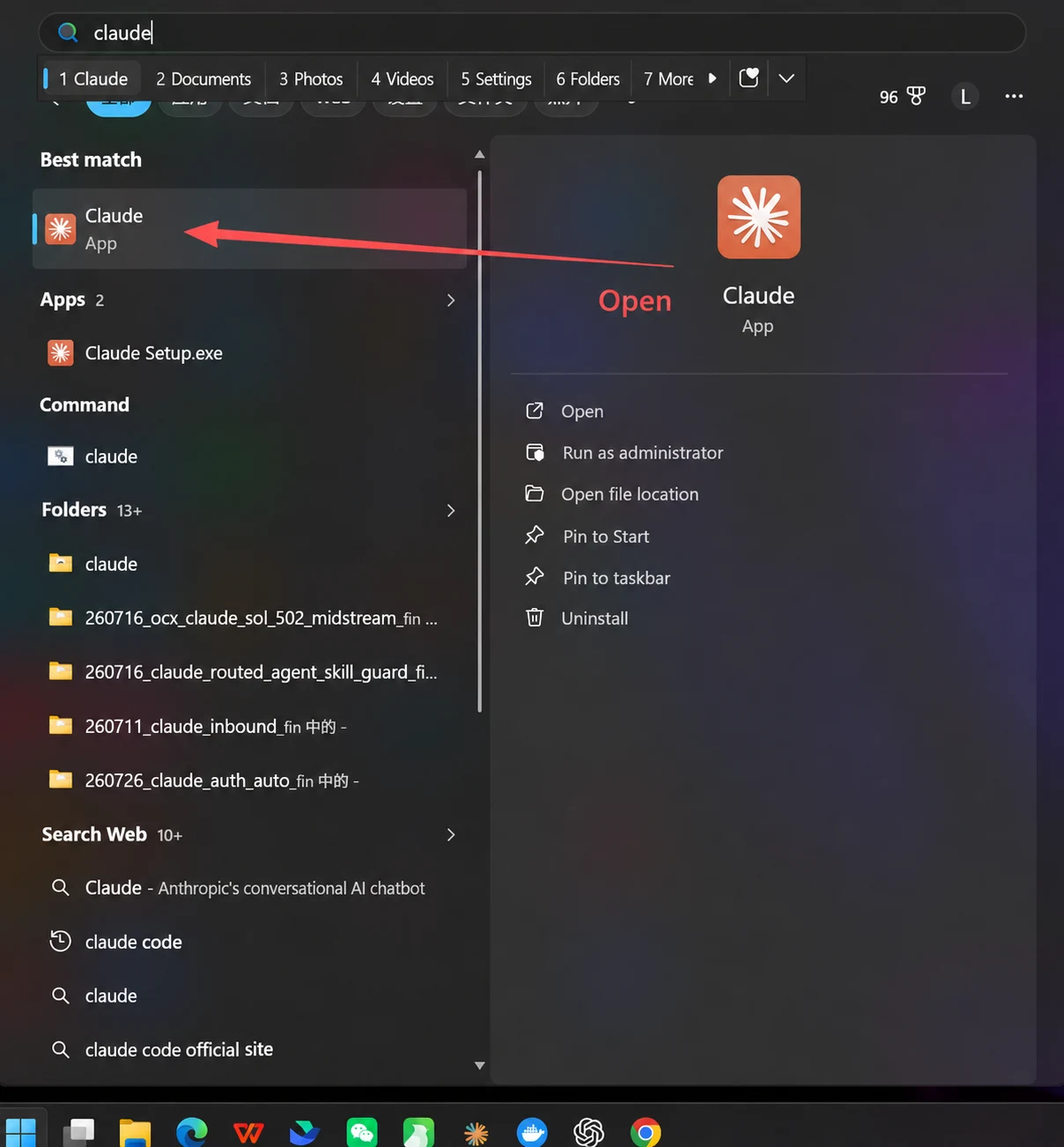
Screenshot 8: English Translation
Annotation: Open.
Windows Search: Best Match; App; Apps, 2; Command; Folders, 13+; Search the Web, 10+.
Claude app actions: Open; Run as Administrator; Open File Location; Pin to Start; Pin to Taskbar; Uninstall.
Web result: Claude - A chatbot developed by the U.S. company Anthropic. Search suggestion: Claude Code Official Website.
Folder-result label: "in". The folder names and filenames remain as shown in the original image.
Visible Chinese input-method candidates: Eat Spicy Food; That's Wrong; Eat; Out; How Miserable; Pull.
If it can respond, the configuration was successful.
If the following message appears:
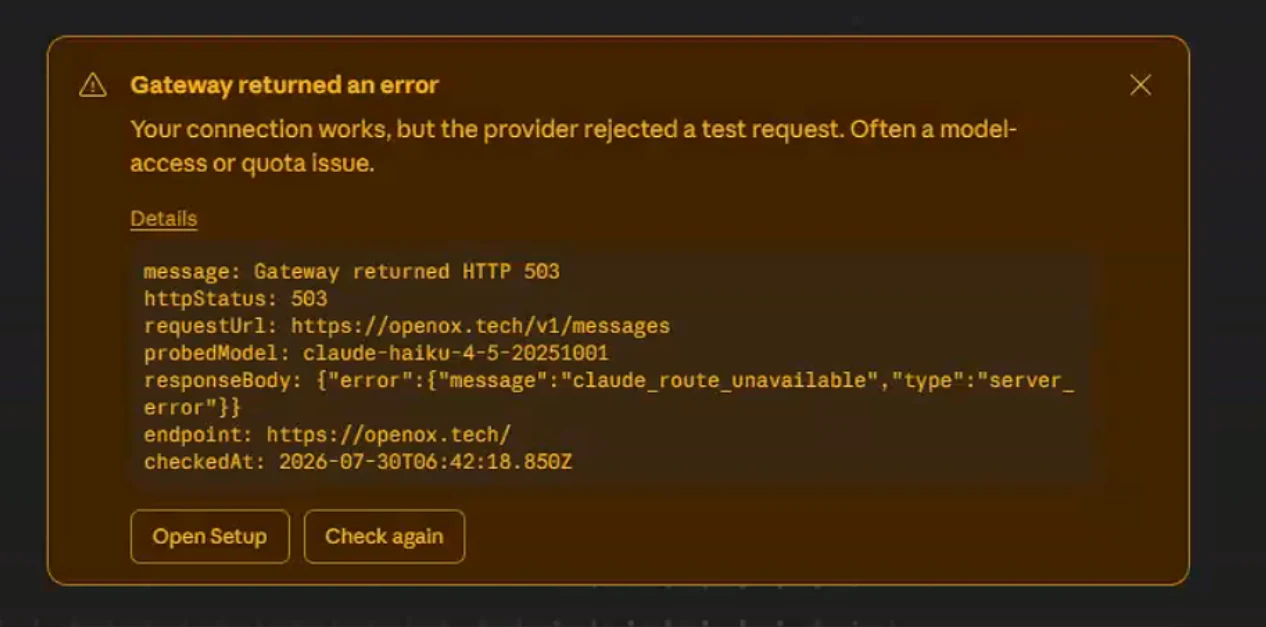
Click the two buttons below to check whether the configuration is incorrect.
If Cowork does not work, enable global mode in your VPN/proxy and download the latest version of Claude.